




|
 |
|
|

|
|
|
|

|
|
|
|
Using Virtual Earth in a Vista GadgetRichard Marsden shows how to configure a Vista Gadget to pull from Virtual Earth. "Vista gadgets are simply HTML files, and are hence very easy to write."
Download files for this article. A feature of the new Vista operating system that has been seeing a lot of recent attention, is that of Gadgets. Vista Gadgets are small programs that sit on the desktop. Samples that come with Vista include RSS feeds, a clock, and simple games. This article is the first of two articles. In this first part, I will show you how to write your own Vista Gadgets that use Microsoft’s Virtual Earth platform. The second part will build on this to produce a gadget that continuously tracks the position of the International Space Station over the Earth’s surface. The following screenshot shows two Gadgets installed on a Vista desktop running the Aero visual interface. The lower gadget is the standard Vista clock. The upper gadget is the Virtual Earth gadget that we will create in this article. The gadgets are in the Windows sidebar. If your sidebar is disabled, it can be enabled by clicking "Windows Sidebar" in Start->All Programs->Accessories. 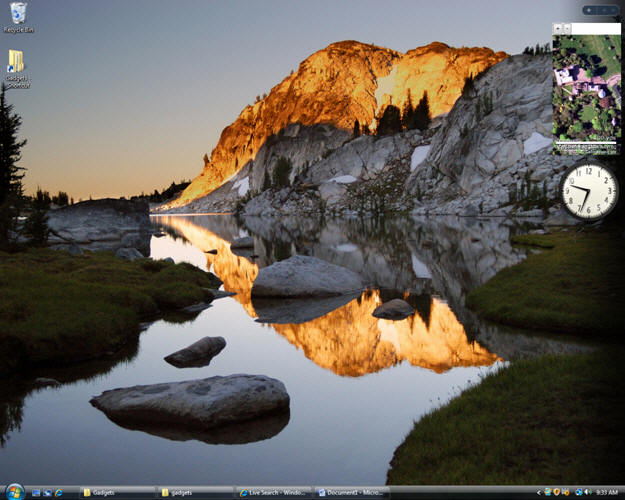 Vista gadgets are simply HTML files, and are hence very easy to write. All you need is a text editor. These examples also use JScript (Microsoft’s version of JavaScript/ECMAScript). Many of the gadgets are located in the Program Files folder, but we will create our gadget in our personal gadget storage area. Press the Windows Key + R to get the ‘Run’ prompt. Type: %userprofile%\AppData\Local\Microsoft\Windows Sidebar\Gadgets This will open your personal gadgets folder. To avoid having to re-type this folder, I usually create a shortcut. Create a new folder for your gadget in your Gadgets folder. It must have the suffix ".gadget". Use "VE_Sample.gadget" for this example. Here is an example with two custom gadgets defined: 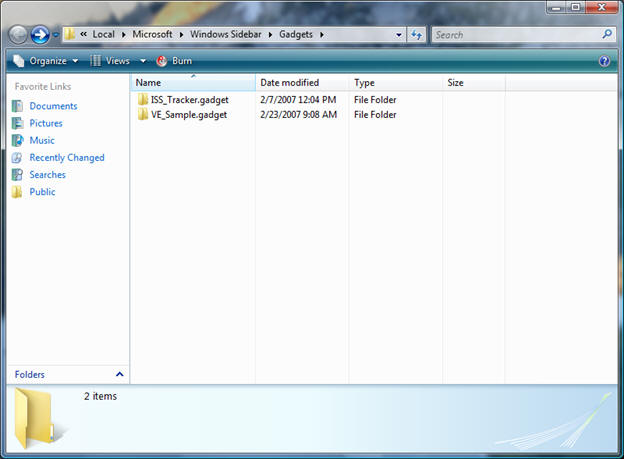 Open your new VE_Sample.gadget folder. This will store all the files required for your gadget. You can add icons, graphics, JScript, HTML, etc. This example uses the bare minimum: a manifest file, and a HTML file. The manifest file tells Vista about the Gadget. Start Notepad (or your text editor of choice), and write the following: Save this to the file "gadget.xml" in your new gadgets directory. Notice that this manifest includes the gadget’s name, HTML file name (VE_Sample.html), and some descriptive information (author, URL, etc). Next we shall write the actual Gadget. Write the following to a new file called "VE_Sample.html" in the gadget directory: As you can see, the gadget code resembles a conventional web page. The header includes our JScript code. First we include the Virtual Earth v3 script. This is followed by three callbacks. The first (onPageLoad) is called by the body tag when the page loads. This creates the Virtual Earth map object, sets it to display aerial photography, hides the control dashboard, and centers the map on the Royal Greenwich Observatory in London. The dashboard is hidden due to the general shortage of space in gadgets such as this. The observant reader will notice that we do not centre the map exactly on the Prime Meridian. This is because the observatory is not positioned symmetrically about the Greenwich Meridian. Also, Virtual Earth uses the relatively modern WGS84 geoid which has its Prime Meridian approximately 102 metres to the east of the Greenwich Meridian. The remaining two callbacks are for the "+" and "-" buttons that we shall create. These simply change the zoom level of the map. The user can also pan the map by dragging with the mouse in the conventional manner. The body of the gadget is also relatively simple. The gadget size is defined in the main body element. We define three elements: the Zoom buttons are at the top. After a page break, an empty div called myMap is defined to hold the map. And that is it! Only two files are required to create a simple Vista Gadget. Next we need to tell Vista to use our new gadget. Do this by clicking on the "+" symbol at the top of the Sidebar. This will display your Gadget Gallery, which will look something like this: 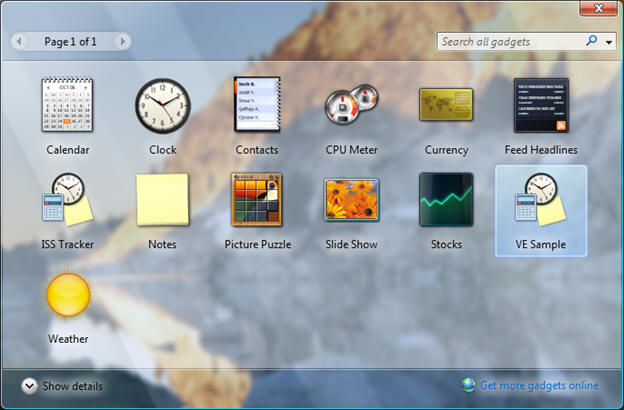 Our new gadget appears with the generic gadget icon because we have not defined a custom icon. Double click on the VE_Sample gadget, and it will be inserted into the Windows Sidebar. In the second part of this article, I shall extend the gadget to automatically track the International Space Station.
Further Information http://en.wikipedia.org/wiki/Greenwich_meridian
 Author: Richard Marsden Author: Richard MarsdenEmail: enquiries(AT)winwaed.com URL: http://www.winwaed.com Richard Marsden is the proprietor of Winwaed Software Technology, LLC which provides software consulting and development services, specializing in both MapPoint and online mapping applications. He operates the Mapping-Tools.com Website for MapPoint Tools and Utilities, and recently launched the GeoWeb Guru a community website for developers of the geospatial web. In 2008, Richard was awarded Virtual Earth MVP status by Microsoft. Prior to Winwaed, Richard worked as a software developer working on seismic processing algorithms for the oil exploration industry. He holds geology and geophysics degrees from the University of Cambridge (Churchill College), and the University of Durham; and an interdisciplinary MBA from the University of Dallas.
|
|
|
|
|
||||||||||||||||||||||||||||||||||||||||||||||||||||||||||||
|
||||||||||||||||||||||||||||||||||||||||||||||||||||||||||||||||||||



