




|
 |
|
|

|
|
|
|

|
|
|
|
Extending the MapPoint ActiveX Control - Pt. ISergiy Pavlov demonstrates an ingenious method to add functionality to the MapPoint ActiveX control
Part One of Two 1. Introduction Despite the powerful features of MapPoint 2002, we often get cut-down functionality when it comes to ActiveX incarnation of the mainstream application. Take one, for instance - the Location Sensor from MapPoint’s Tools menu. Whatever the reason may be for making it inaccessible through ActiveX (COM) interface, let’s try to find a way of activating this feature (as well as few others) programmatically. The functionality we are interested in is that available through MapPoint applications’ main menu and, therefore, is being handled through processing of the user interface (menu) event. We are presuming that MapPoint ActiveX control has the Location Sensor event handling procedure intact and is simply unavailable for the user because the menu is not available. With such a presumption in mind, we will try to utilize the functionality of Windows messaging API to activate Location Sensor event handler. That can be done by sending/posting proper WM_COMMAND window message to a designated MapPoint window (don’t ask which one - we will find it out soon). See Messages and Message Queues for more information about Microsoft Windows messages. Before we can send a message, we need to know two things:
We will devote our most efforts to finding the first of those two key subjects: 2. The window handle (in short notation: hwnd). This is a number that uniquely identifies the window. Basically, it represents an address of the memory space that is dynamically allocated by the system for a particular window object. It is, therefore, to be updated each time the window (form, control, etc.) is created. Fortunately, Windows API has the functionality, which helps in finding a handle by given invariant window’s properties: title and/or window class. Download and expand the Test VB project. If you have the European MapPoint version, set conditional compilation argument EURO to 1 in Project properties ->make Run the Microsoft Spy++ utility (you should find it somewhere under ‘Microsoft Visual Studio tools’ sub menu in ‘Start’ -> ‘Microsoft Visual Studio’ menu, depending on your particular Visual Studio product/configuration) together with both MapPoint application and the Test application. In Spy++, find and expand nodes corresponding to the MapPoint application (Fig.1) and nodes referring to the MapPoint ActiveX control in the test aplication (Fig.2). 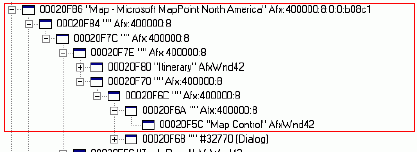 Figure 1 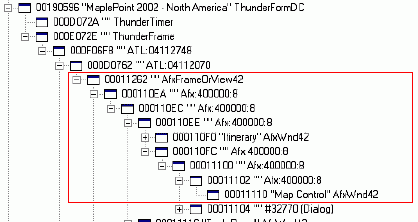 Figure 2 It will reveal the fact that both MapPoint application’s main frame window [hwnd:00020F86; title: ‘Microsoft MapPoint'] and the ActiveX control’s window [hwnd:00011262; window class:‘AfxFrameOrView42’] have an identical set of child window objects. The hierarchy tree also gives us an idea on how a particular window is related to its parent and children, so we may construct an algorithm retrieving that window’s hwnd dynamically. For instance, the control’s outer window [hwnd:000F06F8; window class:‘ATL:04112748’] is put in a VB frame [hwnd: 000E072E; window class: ‘ThunderFrame’] that fortunately grants access to its hwnd property. That makes it only matter of a couple of API calls to get grip on its child [hwnd:000F06F8] and, recursively, to all the windows in the hierarchy. That explains why, from this moment on, Windows API functionality has to be utilized. By incorporating all API-related tasks into a specialized VB class, we will simplify our further moves and make them better understood. For that purpose, we will take and adjust for our needs TWindow class from John Robbins's "BugSlayer" article in April 1999 issue of Microsoft Systems Journal. The changes are specifically aimed to incorporate the ability to find a window by just a part of its title or class name and the ability to send/post messages to the window of interest. Using TWindow functionality in the example above, the control’s outer window [hwnd:000F06F8; window class:‘ATL:04112748’] can be found as follows:
By the end of this code fragment, TWnd object will refer to MapPoint ActiveX control (its outer window, precisely). It is now to be considered as a container for a group of its own child windows. Similarly, by iterating further and further, we are going deep down the hierarchy, until the very window that is responsible for receiving and processing a particular MapPoint command is caught. Sounds good, however difficult it is to recognize which window is responsible! Let’s continue playing with MapPoint application and Microsoft Spy++ utility. Activate the 'Messages' tool from the utility’s menu (Fig.3). Then select MapPoint main window as the target (use Finder Tool, top of Fig.5) and configure the utility to record WM_COMMAND messages (Fig.4) sent to the window and its child windows (bottom of Fig.5). 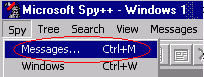 Figure 3 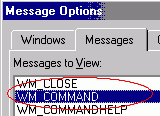 Figure 4 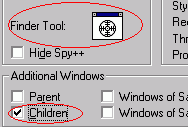 Figure 5 Now, activate LocationSensor from MapPoint menu. Spy++ records an event similar to:
where the hexadecimal number 00020F86 means the command’s ‘Target’ window hwnd: Let’s compare our log with Fig.1, and you will see that the ‘Target’ is the MapPoint main frame [hwnd:00020F86; title:‘Microsoft MapPoint...’]. As we already know, it corresponds to ActiveX control’s window [hwnd:00011262; window class:‘AfxFrameOrView42’] on Fig.2. Using that logic, I designed hWnd_Frame property of the extension class clsMapPoint that finds the target window handle dynamically:
We, therefore, defined the first of the two key parameters to be known for the purpose of sending a command message to a window. Now take a look at the second one: 3. The window message The window message is a code that causes the window to do what we want it to. It is a constant value like "99999" defined by the application design. Therefore, it is to be found once for a particular command. Let’s take another look at the message log:
The decimal number 35331 is the window message by itself! As we already know, we just have to remember that number to use. 4. Putting it all together Activating LocationSensor programmatically is now only a matter of posting WM_COMMAND message # 35331 to a window captured by hWnd_Frame property:
It works for me! Hope it works for you too. You might now want to rediscover some of other MapPoint commands yourself. But don’t let the excitement overwhelm you: if SaveAsWebPage is what you choose to hunt for, then you’ll find that the technique does not work in this case, at least by now. Let’s talk about it next time. I will also publish a full version of the extension class clsMapPoint implementing other methods and properties as well as a full collection of MapPoint menu commands, so that will make them even easier to use. (Note: I would like to thank Bob Chase for his valuable advice and help.)
Author: Sergiy Pavlov Email: baal_2000(AT)yahoo.com Sergiy Pavlov is a GIS/GPS/Tracking Solutions Developer for GEOTAB North America in Burlington, ON. Professional interests range from software and algorithms development to electrical engineering.
|
|
|
|
|
||||||||||||||||||||||||||||||||||||||||||||||||||||||||||||
|
||||||||||||||||||||||||||||||||||||||||||||||||||||||||||||||||||||



