

spacer1
spacer2 1_1 1_2
2_1
 Subscribe
 The MP2K Update!


 Magazine
Front Cover
What's New
Articles
News
Sample Data
Gallery
Advertise
About
 Features
MapPoint 2011
Press Releases
MapPoint Forums
Companies
Link to MP2Kmag
Wish List
MapPoint Trial
Authors
 Earlier Content
Past News Items
Past What's New Announcements
 Sponsors
 Order

MapPoint 2011

Programming MapPoint in .NET

MapPoint Book

  Spatial Community
SVG Tutorials
MapPoint

Map Visitors

  ARTICLES  


Improving On The MapPoint Geocoding Algorithm - Pt. II

Rainer Barthels database and executable for advanced geocoding in MapPoint

The previous article discussed the limitations of MapPoint's built-in geocoding and presented a strategy using FindAddressResults to work around these limitations. Now we take a look at the executable and database you can use for your own geocoding.

First, download the database and examine the structure.
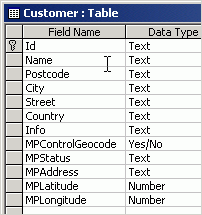
Geocoding Database Structure

This is a sample database, the database actually used by the executable need not have these names, but this is the essence of what the program works with. The first several fields are used as input, and the last several fields are output by the program. The database is in Access 2000 format.

Now, download the program (help file included) and place them in the same folder as the database.

When you first start the program it will prompt you for the location of the database and table as well the columns for input and output.
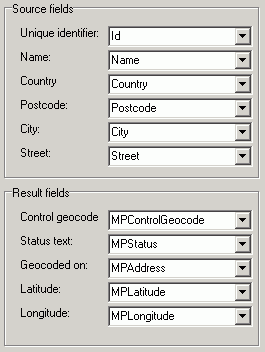
You will also need to specify the version of MapPoint that you will use for geocoding. This version must be installed on your computer. Note that the sample addresses in the customer.mdb database are all in Germany. If you only have the North American version of MapPoint you may want to stop at this point, go back to the database and type in several sample North American addresses before proceeding.

The program then goes into an interactive mode where you can see and edit records as well as see the output from the geocoding. Click the pushpin in the corner to load MapPoint and perform the geocoding.
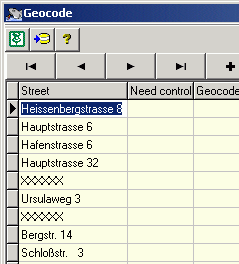
That's it! This program is unsupported and for demonstration purposes only, your mileage may vary. However, feel free to leave feedback and any comments or questions in the forum below.

  - Eric Frost

Discuss this story in the forum.

Author: Rainer Barthels
Email: rbarthels(AT)gmx.de
Rainer Barthels is working for 10 years in the field of optimization of vehicles (VRP=vehicle routing problem). He studied phyiscs at the university of Stuttgart and is now senior project manager at Kempten/Germany but heavily involved in programming (Delphi, C++).


Google
 
MP2Kmag Internet


 Recent Discussion
-MP 2011 Silent Install with Key AND Activation?
-Convert .GmL to a spatial data type
-bingmaps: Spouse run interference on an Indianapolis road trip for Super Bowl? Get the best view on Bing Maps. BYO beer & chips*http://t.co/hkZlFnJ4
-MAP POINT Route Planning
-MapPoint Routes: Multiple start points, one stop point.
-Export Territories - plot them on google maps or bing
-bingmaps: Check out this blog and interview to learn more about LifeLens and Bing Maps http://t.co/mlNHyKdW
-Can't make working OLAP add-in
-Importing data from Canada?
-MapPoint North America 2011 - UK Postcodes?
-Seeking Church Demographic info for MP2011
-Exporting Pushpin Counts in a radius
-bingmaps: RT @bing: Congrats to the Imagine Cup Grant Winners, esp. OaSys and LifeLens using @Bing maps! http://t.co/Fha9Cf0V
-Store Distance Calculations
-Modify maps
-Win7x64SP1 clobbers MapPoint 2010....
-bingmaps: RT @ChrisPendleton: New Bing Maps Features Help You Feel Spatial…
-Hope it doenst soudn TOO much like Im a Noob.. BUT...
-Capture click events from MapPoint to my Winforms app?
-bingmaps: @natelawrence Thanks for the feedback...check out our*Forum for technical assistance:*http://t.co/WDAjNJCD
-bingmaps: @Jordanaous*We're glad you're enjoying Streetside...thanks for using Bing Maps!
-bingmaps: @Goodlett*A beautiful partnership, indeed.
-bingmaps: @urbanmapping Love the fascinating questions you guys are asking, and the important information you provide. Keep it up!
-bingmaps: @beeinthehive*Happy to help! Thanks for using Bing Maps!
-bingmaps: @Geocrusader80* Isn't the imagery amazing? Glad you're a fan!
 Resources
Browse GIS books and periodicals
Find a MapPoint Partner or Consultant
Real Estate Columbia Homes for Sale by Owner
Excellent Great Loop Travel Guide


Want Your Site To Appear Here?

   © 1999-2009 MP2K. Questions and comments to: website@mp2kmag.com
  Microsoft and MapPoint 2002/2004/2006/2009 are either trademarks or registered trademarks of Microsoft.


• Buy Your Car Used Cars UK, Car Lease and Contract Hire
