




|
 |
|
|

|
|
|
|

|
|
|
|
Map-In-A-Box Puts MapPoint Maps Into MapInfoMapping Solution's new product seamlessly ties the functionality of Microsoft's MapPoint 2002 into MapInfo Corp.'s full-featured geographic information system (GIS) - MapInfo Professional (versions 6.0 and higher).
The platform provided by Map-In-A-Box combining the two products is arguably the most advanced and cost-effective GIS/mapping solution available today. After a brief overview, we'll break down the review into sections covering what Map-In-A-Box offers to MapPoint and MapInfo users respectively. Although there are some overlapping features, from an end-user's perspective MapPoint and MapInfo each have a lot to offer the other does not and can be viewed as complementary products. In a nutshell, MapPoint offers very affordable detailed street data while MapInfo allows robust geographic visualization of data and very complete geo-analytical (i.e. traditional GIS) capabilites. Map-In-A-Box seamlessly integrates MapPoint maps (both North American and European) as a background image into the rich MapInfo interface giving users the functionality of both products After having installed the two base programs (MapPoint and MapInfo) and Map-In-A-Box and a couple warning messages later, you are ready to generate a MapPoint map in MapInfo. 
For MapPoint users: - rich thematics 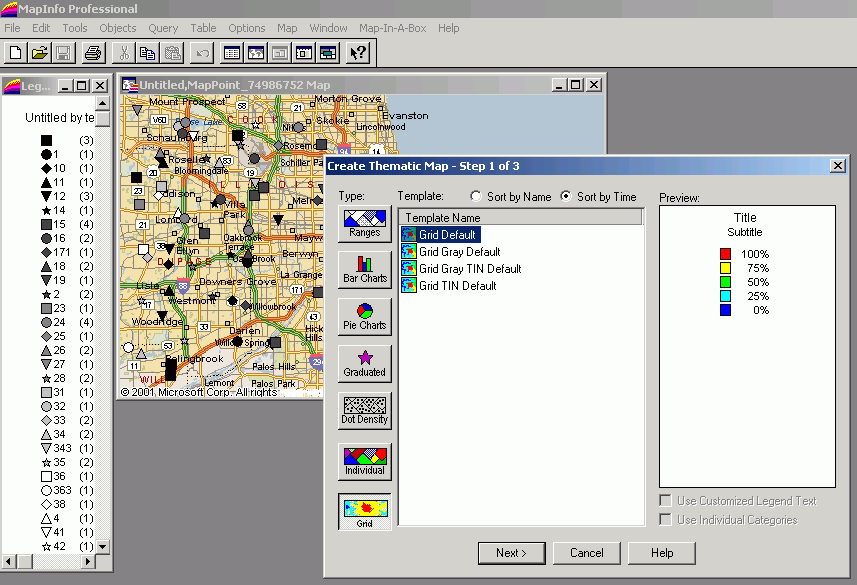
MapInfo Professional's options for thematically displaying your custom data are all far more robust than MapPoint such as allowing for more than eight multiple symbols, ability to use fonts rather than simple icons for custom symbols, dot density maps, and much more including the ability to generate raster 'grid' images or color gradations from your data. - layer editing and control 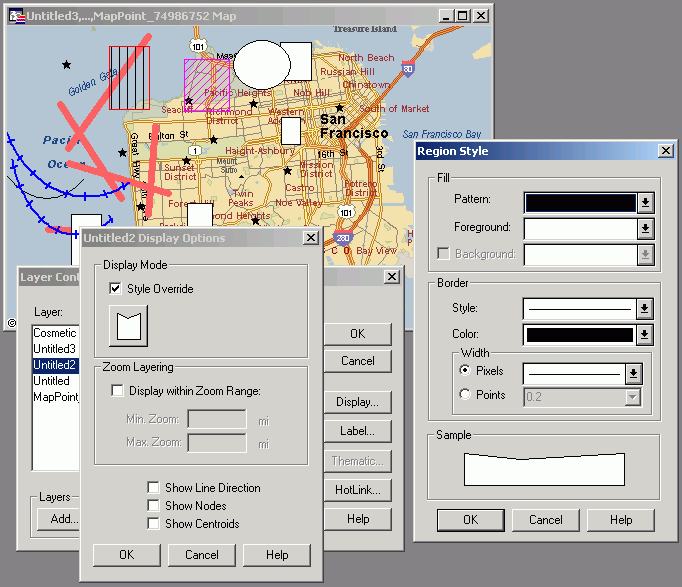
Using Map-In-A-Box and MapInfo, you have very precise control over your own layers which are viewed on top of the MapPoint map. MapInfo's line, shape, and text objects provide a much richer set of options than using MapPoint alone. - geo-analytical (GIS) functionality 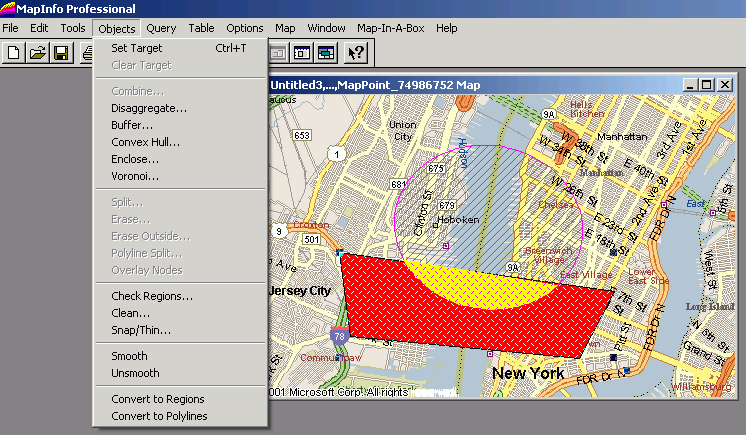
Finally, using MapInfo, a full range of GIS functionality unavailable in MapPoint is now at end-users fingertips such as polygon split and many more operations. Limitations: There will be a learning curve to learn MapInfo's powerful
interface, but it's still Windows-based and conforms to standard Window's application
conventions (Edit menu - Copy/Paste, Windows menu, Help menu etc.) so it should be
straightforward. There's a large community of MapInfo users and developers providing free
advice on an e-mail list provided by Directions Magazine: For MapInfo users: - background map As seen in the screenshots above, Map-In-A-Box creates a nice background image in the MapInfo map windows. - geocoding 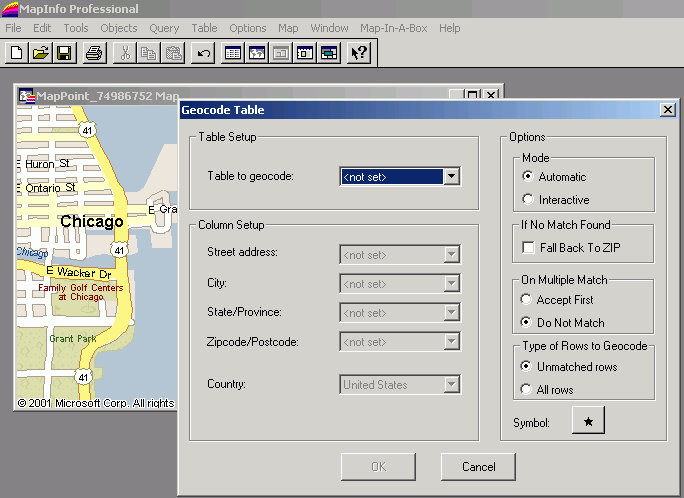
Notably, Map-In-A-Box provides a relatively sophisticated (by MapPoint standards at least) geocoding engine within the MapPoint interface. A combination of GDT and Navtech streets are included in MapPoint. - drivetime polygon
Details on these features can be found in Mapping Solutions marketing materials below. Limitations: First, don't be misled that MapPoint's built-in datasets will be available as layers for vector editing. The MapPoint maps appears as a single raster layer behind your vector datasets. Also, quality layout and printing output is limited to small map sizes by the raster image. Final word: As a long-time user of MapInfo and MapPoint, I found playing with Map-In-A-Box endlessly fascinating and compelling. Mapping Solutions is aiming for the wide gulf which exists between relatively simple mapping products such as MapPoint and a mainstream, powerful GIS product - and succeeds. links:
communities:
Author: Eric Frost Email: website(AT)mp2kmag.com URL: http://www.mp2kmag.com Eric is Editor and Publisher of MP2K Magazine and is a part-time student in University of Chicago's evening MBA program. Eric recently finished the MP2Kmag Guide What's New in MapPoint 2004.
|
|
|
|
|
||||||||||||||||||||||||||||||||||||||||||||||||||||||||||||
|
||||||||||||||||||||||||||||||||||||||||||||||||||||||||||||||||||||



